Always listening
A persistent HTTPS subscription, with automatic reconnects and no window to keep open.
ntfy for Mac
Point NTBX at ntfy.sh or your own server, and every message arrives as a macOS notification — with priority, tags, action buttons and attachments. No browser tab to keep alive.
Native app. Direct HTTPS. Keychain tokens.
Free on the Mac App Store · macOS 14 or later
Quick start
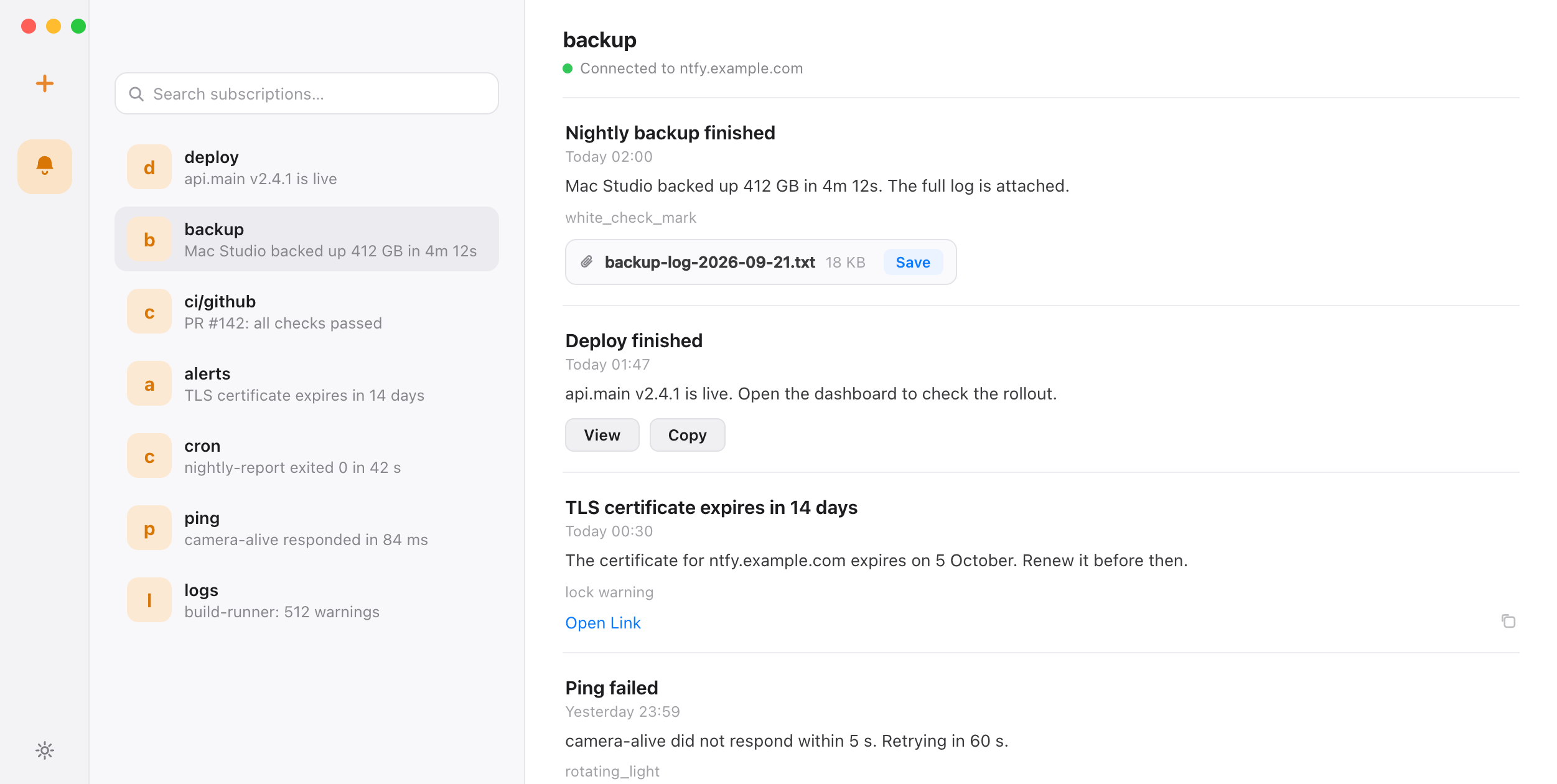
Keep publishing with the scripts and services you already use. NTBX holds the subscription and turns each message into a native notification.
Get NTBX from the Mac App Store, allow notifications, and enable launch at login if you want it running with your session.
Paste an HTTPS topic URL, or enter the server and topic separately. For a protected topic add a Bearer token with read permission; NTBX stores it in Keychain.
Publish with curl or the ntfy CLI. The message shows up in the inbox and in Notification Center.
curl --fail --show-error \
  -H 'Title: Backup finished' \
  -H 'Priority: 4' \
  -H 'Tags: floppy_disk' \
  --data-binary 'Nightly backup completed in 3m 12s' \
  "${NTFY_TOPIC_URL:?Set your HTTPS topic URL}"
For a protected topic, add an Authorization header with a token that has publish permission. See the authenticated example →
The ntfy project recommends its installable web app on the desktop, and the CLI prints messages into a terminal. Both work; neither is a Mac app. NTBX is: a menu bar client with a live subscription, so alerts arrive when the browser is closed and nothing scrolls past in a shell window.
A persistent HTTPS subscription, with automatic reconnects and no window to keep open.
Priority decides the sound and the alert style, exactly as macOS expects.
Unread count and connection status at a glance, with a findable history behind it.
Message tags, click URLs and the open-in-browser path are handled natively.
view, copy and http actions work from the notification, with confirmation before any HTTP action runs.
Save an ntfy attachment to the folder you pick — never automatically.
Your Mac connects straight to the ntfy server you configured over HTTPS, with no relay in the middle. Tokens live in macOS Keychain, the app runs sandboxed with a hardened runtime, and there is no account, no analytics and no third-party tracking SDK.
Before you connect
The ntfy project ships mobile apps, a web app and a CLI, and points desktop users at the installable web app. NTBX is an independent native macOS client for the same protocol, so you get a menu bar app instead of a browser tab. Compare the options.
Yes. Enter the HTTPS server URL and topic, and add a Bearer token if the topic requires one. The server certificate must be trusted by macOS; plain HTTP endpoints are not supported.
ntfy can update or clear a notification. NTBX follows that: an update replaces the notification in place, and a clear removes it from Notification Center and the inbox, so what you see matches the server state.
No. NTBX manages its own subscriptions. Your sender can be curl, the ntfy CLI, or any tool with an ntfy integration — the CLI is only useful on the Mac if you want a scriptable subscriber that runs local commands.
No. NTBX is an independent client for the ntfy protocol, built for macOS, and it is not affiliated with the ntfy project. It connects to ntfy.sh or to compatible self-hosted servers.